


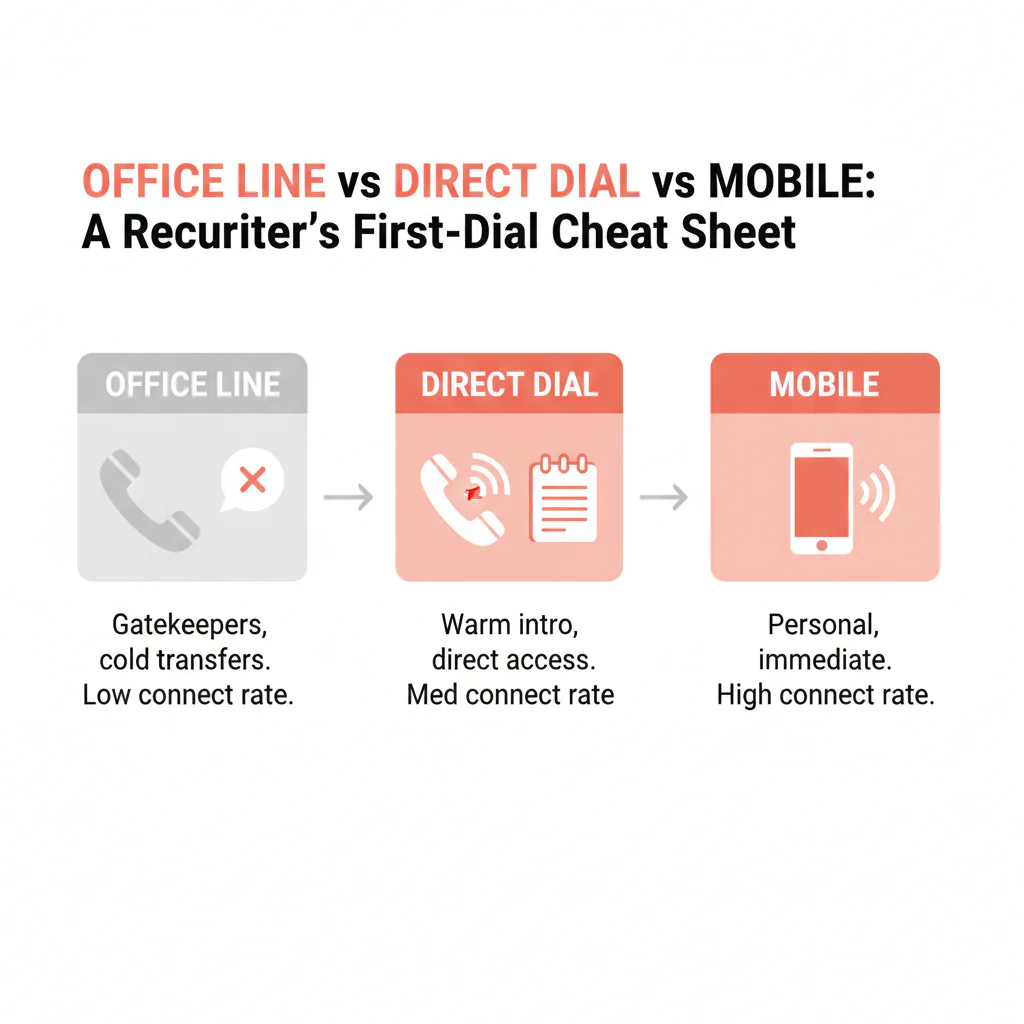
Office line vs direct dial vs mobile: how to choose the right first dial
Ben Argeband, Founder & CEO of Heartbeat.ai — Cheat sheet before call blocks.
What’s on this page:
Who this is for
Recruiters deciding best first contact method without getting stuck with gatekeepers. If you’re staring at multiple phone numbers and you need a clean first move (without burning the market), this is the decision guide.
Quick Answer
- Core Answer
- Use office lines for staff-led routing, direct dials to reach a specific person faster, and mobile numbers only when urgency and permission-first outreach make sense.
- Key Insight
- Office lines route to staff; direct dials reduce phone-tree friction; mobiles can be fastest but require tact, channel policy awareness, and immediate opt-out suppression.
- Best For
- Recruiters deciding best first contact method without getting stuck with gatekeepers.
Compliance & Safety
This method is for legitimate recruiting outreach only. Always respect candidate privacy, opt-out requests, and local data laws. Heartbeat does not provide medical advice or legal counsel.
If you only have one number, match your opener to the routing you’ll hit: staff-first for an office line, clinician-first for a direct dial, and permission-first for a mobile number.
Framework: The “Don’t Waste the First Dial” Rule: Match number type to goal
Your first dial is either a fast path to a clinician conversation or a slow walk through routing. The rule: pick the line type that matches the goal of the touch, not the channel you personally prefer.
- If the goal is a clinician conversation in this call block: start with direct dial.
- If the goal is operational routing (who handles staffing, best time/number, credentialing contact): start with the office line.
- If the goal is urgent coverage and you can be respectful: consider a mobile number with permission-first language and clean opt-out handling.
The trade-off is… the fastest path to a human is not always the safest path for relationship, compliance, or brand. You’re optimizing for speed without creating complaints or getting blocked.
Definitions (so your team stops arguing about labels)
Office line
Line type definition: a practice or facility’s main number intended to route calls to staff, departments, or an IVR (phone tree). In recruiting, it’s the best entry point for process questions and permission-based routing.
What happens when you dial: you usually hit a receptionist, call center, or IVR. That routing is designed to protect clinician time.
Best use: confirm decision-maker, ask for best time/number for recruiting calls, credentialing/scheduling contacts.
Worst use: trying to force an immediate clinician transfer with no context.
Direct dial
Line type definition: a number intended to reach a specific person (or their voicemail) with fewer routing steps than an office line.
What happens when you dial: it should ring the target or their voicemail, but it can still forward or land in a shared mailbox depending on routing.
Best use: fast clinician access during call blocks; reducing phone-tree friction.
Worst use: repeated redials when you’re consistently hitting voicemail (switch tactics instead).
Mobile number
Line type definition: a personal device number that typically reaches the individual directly (or their personal voicemail).
What happens when you dial: you’re more likely to reach the person quickly, but you’re also more likely to trigger a negative reaction if your outreach is irrelevant, repetitive, or not permission-based.
Best use: time-sensitive outreach with clear identity, relevance, and an easy opt-out.
Worst use: “spray and pray” calling or texting.
Routing and VoIP (quick clarity)
Routing definition: how a call is handled after you dial (IVR, ring group, call forwarding, voicemail). Routing determines whether you reach staff, a clinician, or a dead end.
VoIP definition: phone service delivered over the internet; many practices use VoIP systems that add IVRs, ring groups, and forwarding rules that change who answers.
Diagnostic Table:
Goal → best number type → best first action. This is the COMPACT_TABLE you can keep open during call blocks.
| Goal | Best number type | Best first action | What you’re avoiding |
|---|---|---|---|
| Talk to the clinician today | direct dial | Call during likely between-patient windows; if voicemail, leave a short message with a callback window | Phone trees and switchboards |
| Find the right decision-maker for staffing | office line | Ask for office manager/practice administrator; request the best number/time for recruiting calls | Interrupting clinicians for admin questions |
| Urgent coverage (time-sensitive) | mobile number | Send a permission-first text; if no reply, call once and stop if asked | Repeated cold calls that create complaints |
| Need a written follow-up after voicemail | direct dial then email | Leave a short voicemail, then send a concise email that mirrors the voicemail and offers two callback windows | Long voicemails and vague “just checking in” emails |
| Reduce gatekeeper friction | direct dial then office line | Dial direct first; if blocked, use office line to ask for preferred contact method | Wasting the first dial on routing |
| Validate whether you have the right number | office line | Ask staff: “Is this the best number for recruiting calls for Dr. X?” and accept “no” gracefully | Assuming line type from area code |
| Protect relationship in a small market | office line then direct dial | Get permission on timing/number; then call direct at that time | Surprising someone on a personal device |
For channel order details, use: phone vs email: which to use first for provider outreach.
Step-by-step method
Step 1: Write the goal in one line
- “I need a clinician conversation.”
- “I need the right admin contact.”
- “I need to validate routing and preferred channel.”
If you can’t write the goal, you’ll default to whatever number looks easiest and waste the block.
Step 2: Pick the line type that matches the goal
- Clinician conversation: direct dial first.
- Admin/process: office line first.
- Urgent and respectful: mobile number with permission-first language.
Step 3: Use a line-type-specific opener
- Office line (staff-first): “Hi, I’m calling about a clinician opportunity. Who’s the best person to speak with about recruiting calls for Dr. ___?”
- Direct dial (clinician-first): “Dr. ___, quick one—are you open to hearing about a role that fits ___? If not, I’ll get out of your way.”
- Mobile number (permission-first): “Hi Dr. ___—recruiting question. Is it okay to call you for 60 seconds about ___? If not, what’s the best number?”
Step 4: Handle routing outcomes with an if/then flow
- If you hit an IVR: stop redialing. Use the office line path: ask for the office manager/administrator and request the best number/time for recruiting calls.
- If staff answers and screens you: give a one-sentence reason (schedule/call/location) and ask for the preferred contact method. Don’t argue.
- If a call center answers: ask for the best number/time for recruiting calls and whether there’s a preferred channel for clinician outreach.
- If an answering service picks up (after-hours): ask what the preferred process is for recruiting messages and whether they can take a callback request for the next business day.
- If you reach voicemail on direct dial: leave a short message with a callback window, then switch channels (email or office line validation) instead of looping.
- If you reach a mobile number: keep it permission-based. If you get an opt-out, log it and suppress immediately.
Step 5: Log outcomes by line type (not just “calls made”)
To improve, you need to know which line type is producing real conversations versus routing noise.
Weighted Checklist:
Score each line type for the specific search. Multiply by weight, total it, and start with the highest score.
| Decision factor | Weight | office line | direct dial | mobile number |
|---|---|---|---|---|
| Need clinician conversation within this call block | 3 | 0 | 3 | 3 |
| Gatekeeper/IVR friction expected | 2 | 0 | 2 | 2 |
| Known clinic hours or limited call windows | 2 | 0 | 2 | 2 |
| Relationship sensitivity is high | 2 | 2 | 1 | 0 |
| Internal policy confidence for this channel (and ability to honor opt-out) | 3 | 3 | 2 | 1 |
| After-hours outreach required | 1 | 0 | 1 | 1 |
| Need admin workflow info | 2 | 2 | 0 | 0 |
Interpretation: If mobile number wins, you still use permission-first language and you stop on opt-out. If office line wins, you’re optimizing for routing and relationship, not speed.
Common pitfalls
1) Treating an office line like it’s a clinician line
Office lines are built to route through staff. If you push for the clinician immediately, you’ll get screened or sent to a generic inbox.
- Fix: ask for the best number/time for recruiting calls and follow the process.
2) Saying the wrong thing to staff
Staff can help you route correctly, but they’ll shut down fast if you sound evasive or demanding.
- Avoid: “I need to speak to the doctor right now.”
- Avoid: “It’s personal.”
- Use instead: “It’s a recruiting question about schedule/call. What’s the best number/time to reach them?”
3) Assuming direct dial means “they’ll answer”
Direct dial reduces routing steps. It does not guarantee pickup.
- Fix: if you repeatedly hit voicemail, change the approach (office line validation or email) instead of looping.
4) Overusing mobile numbers because they feel fast
Mobiles can be the fastest path to a human, and the fastest path to a complaint if you’re sloppy.
- Fix: permission-first, one attempt, then stop or switch channels.
5) Failing opt-out hygiene
If someone opts out, your workflow must make it easy to comply immediately.
- Fix: log the opt-out, suppress future outreach, and don’t “try again later.”
6) Blaming “bad data” when the real issue is routing
VoIP routing (IVR, ring groups, forwarding) can make a correct number behave like a wrong number.
- Fix: treat routing as a signal: pivot to staff-first questions instead of repeated redials.
How to improve results
Improvement comes from measuring outcomes by line type and tightening the first action for each routing scenario.
Metric definitions (use these exact denominators)
- Connect Rate = connected calls / total dials (per 100 dials).
- Answer Rate = human answers / connected calls (per 100 connected calls).
- Deliverability Rate = delivered emails / sent emails (per 100 sent emails).
- Bounce Rate = bounced emails / sent emails (per 100 sent emails).
- Reply Rate = replies / delivered emails (per 100 delivered emails).
Measurement instructions
Measure this by… splitting your next call block into three labeled buckets (office line, direct dial, mobile number) and logging outcomes separately.
- Create dispositions in your ATS/CRM or dialer: IVR reached, staff answered, call center answered, answering service, clinician answered, voicemail, wrong number, opt-out.
- Run a controlled block: same recruiter, same specialty, same time window; only the line type changes.
- Compare Connect Rate and Answer Rate by line type using the definitions above.
- Adjust one variable next block (time window, opener, voicemail, or line type order) so you can attribute improvement.
What to log (so the data is usable)
| Disposition to log | Definition | Next action |
|---|---|---|
| IVR reached | Call routed to a phone tree before a human | Switch to staff-first routing questions; avoid repeated redials |
| Staff answered | Front desk/reception answered | Ask for best number/time for recruiting calls; request preferred channel |
| Call center answered | Centralized scheduling or service center answered | Ask for preferred clinician outreach process and best routing contact |
| Answering service | After-hours service took the call | Ask the preferred process for recruiting messages and next-day callback routing |
| Clinician answered | You reached the clinician live | Confirm interest quickly; ask preferred channel/time for follow-up |
| Voicemail | Call connected to voicemail (staff or clinician) | Leave short message with callback window; switch channels next attempt |
| Opt-out | Explicit request to stop contact on a channel or entirely | Suppress immediately across tools; confirm preference only if offered |
Workflow fit: where Heartbeat.ai helps
Recruiters lose time when numbers aren’t labeled by line type, routing outcomes aren’t tracked, and opt-outs aren’t consistently suppressed across tools. Heartbeat.ai is built to make contact data usable inside real recruiting workflows so your first dial is intentional and your suppression stays clean.
If you want to see how it looks in your market, start free search & preview data.
Outreach Templates:
Office line (staff-first, routing-aware)
Call script: “Hi, this is ___ with ___. I’m calling about a clinician opportunity. Who’s the best person to speak with about recruiting calls for Dr. ___, and what’s the best number/time to reach them?”
If screened: “Totally understand. It’s a schedule/call question. I’m happy to follow your preferred process—what do you recommend?”
Direct dial (clinician-first, short voicemail)
Voicemail: “Dr. ___, this is ___ with ___. I’m calling about a role with ___ schedule and ___ call. If you’re open, call me at ___ today between ___ and ___. If not, no worries.”
Mobile number (permission-first text)
Text: “Hi Dr. ___—___ here (recruiting). Is it okay to call you for 60 seconds about a ___ opportunity? If not, what’s the best number/channel?”
If opt-out: “Understood. I’ll mark you as do-not-contact. Thank you.”
Legal and ethical use
This is for legitimate recruiting outreach only. Identify yourself, be relevant, and keep frequency reasonable. Always honor opt-out requests immediately across all channels.
Consent requirements vary by jurisdiction and channel (especially for texting). If you’re unsure, get guidance from your counsel and default to the least intrusive path.
Compliance baseline reference: FCC overview of the Telephone Consumer Protection Act (TCPA).
Evidence and trust notes
This page separates “what a number is” (line type) from “what happens when you dial it” (routing). That distinction is what keeps recruiters from blaming data when the real issue is an IVR, ring group, or clinic workflow.
- How we think about accuracy, sourcing, and suppression: Heartbeat trust methodology.
- Compliance baseline (TCPA overview): FCC TCPA resource.
- Related channel-order guide: phone vs email: which to use first for provider outreach.
FAQs
What’s the difference between an office line, a direct dial, and a mobile number?
An office line routes to staff or an IVR, a direct dial is intended to reach a specific person with fewer routing steps, and a mobile number typically reaches the individual directly.
When should I start with the office line?
Start with the office line when you need operational routing (decision-maker, best time/number, credentialing/scheduling contacts) or when relationship sensitivity is high and you want permission-based access.
When is direct dial the best first call?
Use direct dial when your goal is a clinician conversation in the current call block and you want to reduce phone-tree friction. If you repeatedly hit voicemail, switch tactics instead of looping.
When should I use a mobile number for recruiting outreach?
Use a mobile number when urgency is real and you can be permission-first. Keep it short, identify yourself, and stop immediately on opt-out.
How do I measure whether my first-dial choice is working?
Track Connect Rate (connected calls / total dials) and Answer Rate (human answers / connected calls) separately for office line, direct dial, and mobile number during the same recruiter/time window.
Next steps
- Use the Diagnostic Table during your next call block and log outcomes by line type.
- Align channel order with your search: phone vs email: which to use first.
- If you want to operationalize this in your workflow, start free search & preview data.
About the Author
Ben Argeband is the Founder and CEO of Swordfish.ai and Heartbeat.ai. With deep expertise in data and SaaS, he has built two successful platforms trusted by over 50,000 sales and recruitment professionals. Ben’s mission is to help teams find direct contact information for hard-to-reach professionals and decision-makers, providing the shortest route to their next win. Connect with Ben on LinkedIn.

