


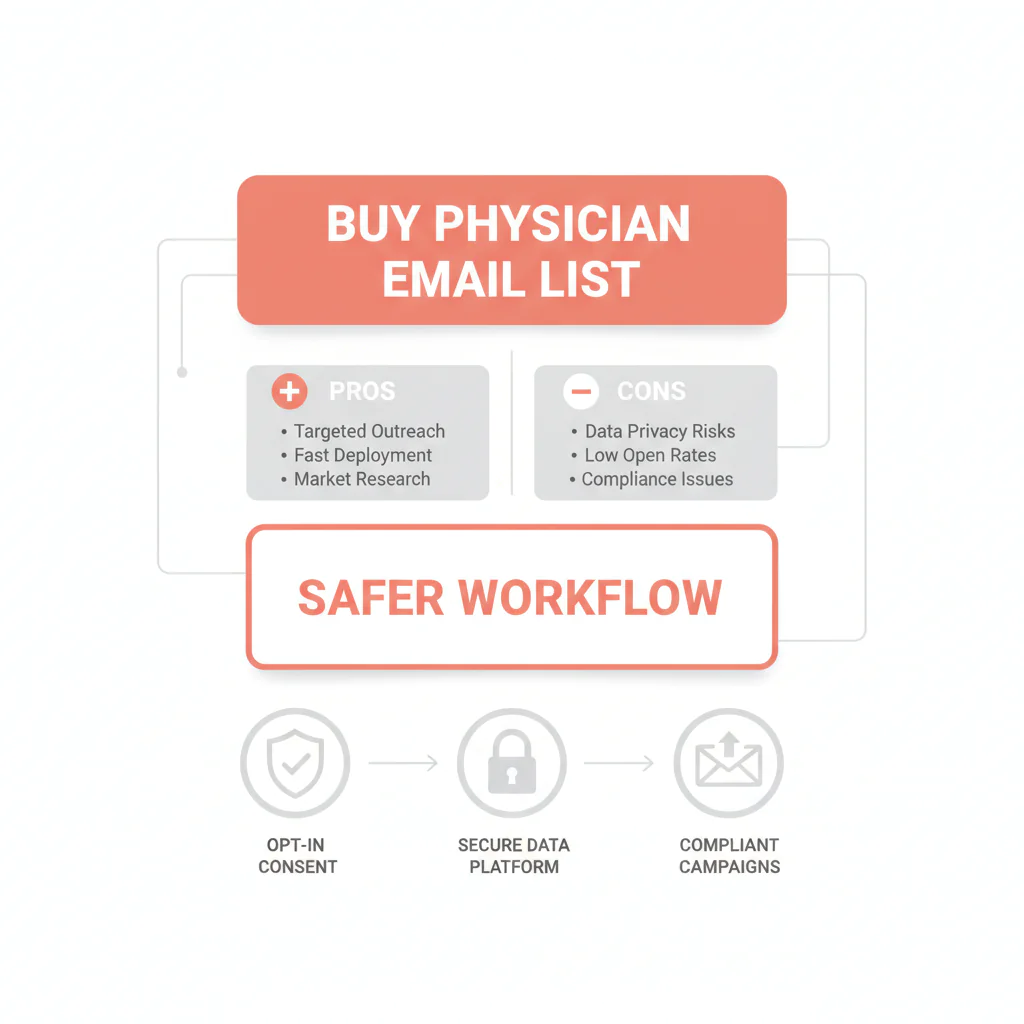
Buy physician email list: pros, cons, and what I’d do instead
Ben Argeband, Founder & CEO of Heartbeat.ai — Commercial intercept: educate, then CTA to preview.
What’s on this page:
Who this is for
You’re a recruiter under pressure to produce outreach volume fast, and you’re considering buying a file because it feels like the shortest path to replies. You also know one bad send can wreck deliverability, waste recruiter hours, and create a mess of opt-outs and bounces you’ll be cleaning for weeks.
This is written for recruiters looking for a quick fix who need hygiene/deliverability reality—without getting lectured.
Quick Answer
- Core Answer
- Buying a physician email list can create fast volume, but it often increases bounces and complaints; access-plus-refresh with verification and suppression is safer.
- Key Insight
- Static files decay and can include addresses that harm deliverability; treat any purchase as a controlled deliverability test with verification, suppression, and source-level monitoring.
- Best For
- Recruiters looking for a quick fix who need hygiene/deliverability reality.
Compliance & Safety
This method is for legitimate recruiting outreach only. Always respect candidate privacy, opt-out requests, and local data laws. Heartbeat does not provide medical advice or legal counsel.
Primary page for this topic: primary guide to physician outreach contact data.
If you only do 3 things:
- Verify before sending and remove high-risk addresses.
- Suppress opt-outs and prior hard bounces across every tool.
- Ramp + monitor by source so you can pause fast if outcomes degrade.
Pros / Cons in one screen:
- Pros: fast initial volume; simple procurement; easy to load into outreach tools.
- Cons: unknown freshness; higher bounce/complaint risk; ongoing recruiter time spent cleaning and re-sourcing.
Buying static lists is risky because of decay. The modern standard is Access + Refresh + Verification + Suppression. If you’re going to buy anything, buy a workflow outcome—not a CSV you’ll “own” and then babysit.
Framework: The “Ownership” Myth: You don’t want to own bad emails.
Recruiting teams get sold the idea that “owning” a list is an advantage. In practice, you end up owning the downside: bounces, spam complaints, and internal blame when deliverability drops.
- What you actually own after a list purchase: your sending reputation, your suppression list, and your measurement history.
- What you don’t control in a static file: freshness, provenance, and whether addresses have turned stale.
- What works operationally: access to contacts that can be refreshed at pull time, verified before sending, and suppressed across every campaign.
The trade-off is… a one-time file can feel faster on day one, but it’s usually slower by week two once you’re cleaning, re-sending, and repairing deliverability.
Diagnostic Table:
Use this comparison table to decide whether a purchase is a controlled test or a deliverability hazard. This is the required COMPARISON_TABLE uniqueness hook, implemented as an operator-facing decision aid.
| Decision factor | Static file purchase | Refreshed access model | Internal verification workflow |
|---|---|---|---|
| Freshness exposure (data decay) | High: unknown age; churn starts immediately | Lower: refresh can happen at pull time | Lowest: refresh + suppression + monitoring loop |
| Deliverability control | Weak: you discover problems after sending | Better: fewer dead addresses if refresh is real | Strong: you gate sends by verification and outcomes |
| Opt-out handling | Often fragmented across tools and campaigns | Central suppression is feasible | Central suppression is mandatory and audited |
| Recruiter time cost | Hidden: cleanup, dedupe, retries, angry replies | Moderate: less cleanup, more targeting | Lowest long-term: fewer retries and fewer dead ends |
| When it makes sense | Only as a small, instrumented test | Ongoing recruiting with consistent outreach | Teams protecting domain health and reply rates |
Entity check: This table assumes you’re managing deliverability, opt-out suppression, and data decay as real operational risks—not theoretical ones.
Step-by-step method
This is the workflow I’d run if you’re tempted to buy a list but you don’t want to torch your email channel.
Step 1: Decide what you’re buying (file vs. access)
A “list” can mean a one-time CSV (a Static list) or an access model where records are refreshed and suppressed over time. If it’s a file, assume it starts decaying immediately.
Operator rule: if the seller can’t explain refresh cadence and suppression handling in plain language, you’re buying risk, not reach.
Copy/paste vendor questions (ask these before you pay):
- What is your refresh cadence, and can records be refreshed at pull time?
- How do you handle opt-out requests and suppression—can I apply my suppression list before export?
- What verification steps happen before data is delivered (and what gets removed)?
- What is the provenance of the data (how collected, how updated, how removals are handled)?
- Do you support source-level monitoring so I can isolate outcomes by source, and what happens when bounce signals come back?
Step 2: Define the metrics before you send (so you can stop fast)
You can’t manage what you don’t measure. For email outreach, these are the non-negotiables:
- Deliverability Rate = delivered emails / sent emails (per 100 sent emails).
- Bounce Rate = bounced emails / sent emails (per 100 sent emails).
- Reply Rate = replies / delivered emails (per 100 delivered emails).
And because your inputs require it:
- Email accuracy (definition): delivered emails / sent emails (per 100 sent emails) for a defined cohort and time window, after suppression is applied; use it as your practical accuracy proxy.
- Decay (definition): the change in deliverability outcomes for the same cohort over time (for example, re-verify or re-test a sample later and compare Deliverability Rate and Bounce Rate).
Green / Yellow / Red signals (no thresholds, just actions):
- Green: stable Deliverability Rate and Bounce Rate by source → continue ramping slowly and keep suppression current.
- Yellow: Deliverability Rate softens or Bounce Rate rises for one source → pause that source, refresh, re-verify, and re-test a small segment.
- Red: multiple sources degrade at once or complaints spike → stop sending, review suppression and verification gates, and isolate the last change (source, template, domain, or tool).
Step 3: Build a pre-send hygiene gate
Before any campaign, create a gate that blocks obvious failure modes:
- Deduplicate against your CRM/ATS and prior campaigns.
- Suppress every opt-out, every “do not contact,” and every prior hard bounce (central list, not per-tool).
- Verify addresses and remove malformed domains, typos, and high-risk patterns.
Step 4: Run a controlled send (protect your domain)
Don’t blast the entire file. Segment and ramp:
- Start with your highest-confidence segment (recently refreshed, verified, and aligned to your role).
- Separate sources so you can diagnose issues (don’t mix multiple vendors in one send).
- Keep copy plain, relevant, and easy to opt out.
Measure this by… tracking Deliverability Rate and Bounce Rate by source on every send, and pausing any source that degrades outcomes.
Step 5: Convert “buying” into an Access + Refresh + Verification + Suppression loop
If you need scale, the safer path is to stop thinking in terms of “owning” a file and start thinking in terms of a loop:
- Access: pull only the contacts you need for current reqs.
- Refresh: update records at pull time (not once per year).
- Verification: validate deliverability before sending.
- Suppression: enforce opt-out and bounce suppression across every campaign.
Heartbeat.ai is built around this operational loop, including ranked mobile numbers by answer probability for teams that run call-first sequences when email is noisy.
Step 6: Tie replies to recruiter workflow (speed to submittal)
Email only helps if your team can act on replies fast. Route replies into the same place recruiters live (ATS tasks, shared inbox triage, or Slack), assign an owner, and set a same-day response expectation.
Weighted Checklist:
Score any vendor or internal approach before you spend money or risk your domain. Total = 100.
- Refresh capability (25): Can you refresh records at pull time? Is refresh cadence explicit?
- Verification workflow (20): Do you verify before sending and suppress risky addresses?
- Suppression & opt-out handling (20): Is there a global suppression list that persists across campaigns and tools?
- Provenance & consent posture (15): Can the source explain collection and how opt-outs are honored?
- Deliverability monitoring (10): Do you track Deliverability Rate and Bounce Rate by source?
- Workflow fit (10): Can recruiters act on replies quickly (routing, tagging, ownership)?
Interpretation: 80–100 = safe enough to test; 60–79 = test only with strict ramp and monitoring; <60 = expect deliverability pain and recruiter time waste.
Outreach Templates:
These templates are designed for legitimate recruiting outreach, with clear context and an easy opt-out. Keep them short and specific.
Template 1: Direct role + schedule respect
Subject: Quick question about [Role] in [City/Facility]
Hi Dr. [Last Name] — I recruit for [Facility/Group]. Are you open to a brief conversation about a [Role] opportunity with [1–2 specifics: schedule/call/team]?
If you’re not interested, reply “opt out” and I’ll stop.
— [Name], [Title]
Template 2: Referral-forward (reduces complaints)
Subject: Who handles [Specialty] recruiting in your group?
Hi Dr. [Last Name] — I’m trying to reach the right person about a [Role] opening at [Facility/Group]. If this isn’t you, who should I contact?
If you’d prefer no emails from me, reply “opt out.”
— [Name]
Template 3: Re-engagement after no response
Subject: Closing the loop
Hi Dr. [Last Name] — closing the loop on my note about [Role] at [Facility/Group]. Should I (a) send details, (b) follow up next month, or (c) stop reaching out?
— [Name]
Common pitfalls
- Blasting a file without instrumentation. You learn about bounces after the damage is done.
- No central suppression. If opt-outs aren’t centralized, you will re-contact people who asked you to stop.
- Mixing sources in one send. You can’t diagnose which source caused the bounce spike.
- Confusing “sent” with “delivered.” Sent volume is activity; delivered volume is reach.
- Not separating outreach sending from your core domain. If a test goes sideways, you don’t want collateral damage on your main corporate email.
- Ignoring decay. If you don’t re-check cohorts over time, you’ll keep paying for the same bad records.
How to improve results
1) Instrument your funnel (measurement instructions)
- Track Deliverability Rate = delivered emails / sent emails (per 100 sent emails) by campaign and by source.
- Track Bounce Rate = bounced emails / sent emails (per 100 sent emails) by campaign and by source.
- Track Reply Rate = replies / delivered emails (per 100 delivered emails) by message template and segment.
Then set a simple stop rule: if a source degrades Bounce Rate or Deliverability Rate versus your baseline, pause it and refresh + re-verify before sending again.
2) Run a cohort-based decay check
Pick a cohort you used this month. In 30–60 days, re-verify and re-test a small sample (with suppression applied). Compare Deliverability Rate and Bounce Rate to the original send. That delta is your practical decay signal for that source and segment.
3) Improve targeting before you increase volume
Better segmentation usually beats more volume. Align outreach to what physicians screen for: schedule, call, comp structure, and location constraints. If you can’t state those clearly, you’ll get low replies even with perfect deliverability.
Legal and ethical use
I’m not your attorney, but here’s the recruiter-operational view: compliance is part of deliverability. If recipients mark you as spam, mailbox providers learn fast.
- Include a clear opt-out mechanism and honor it quickly (central suppression).
- Use accurate sender identity and truthful subject lines.
- Send only for legitimate recruiting outreach with a reasonable relevance basis.
Reference: FTC CAN-SPAM Act compliance guide.
Evidence and trust notes
When we talk about list risk, we’re talking about deliverability mechanics and measurement. For how Heartbeat evaluates sources and quality, read our trust methodology.
- Compliance baseline: CAN-SPAM guidance (FTC).
- Deliverability fundamentals: Google Workspace deliverability basics.
- Monitoring: Google Postmaster Tools (use it to monitor reputation trends and spam-rate signals over time).
Related internal reads for operators:
- Provider data refresh cadence: what “fresh” should mean operationally
- Email verification for healthcare recruiting (how to reduce bounces)
- CAN-SPAM for healthcare recruiting: practical do’s and don’ts
FAQs
Is it ever okay to buy a physician email list?
It can be okay to test a source if you treat it like a risk-managed experiment: verify first, ramp slowly, monitor Bounce Rate and Deliverability Rate by source, and enforce opt-out suppression.
What’s the biggest operational risk with a static file?
Deliverability degradation. High bounces and spam complaints can reduce future inbox placement, even when you later send to better data.
How do I know if my outreach is actually reaching inboxes?
Use Deliverability Rate = delivered emails / sent emails (per 100 sent emails) and Bounce Rate = bounced emails / sent emails (per 100 sent emails). Track both by campaign and by data source.
What should I do when someone replies “opt out” or asks me to stop?
Add them to your global suppression list immediately and ensure that suppression is applied across every tool and campaign. Don’t rely on a single platform’s local unsubscribe list.
What’s a safer alternative to buying a one-time file?
An access model with refresh, verification, and suppression. You pull what you need for open reqs, keep it current, and reduce repeated sends to dead addresses.
Next steps
- Read the deeper guide: primary guide to physician outreach contact data.
- Pressure-test your current source with verification: email verification for healthcare recruiting.
- When you’re ready to see what access + refresh looks like in practice, start free search & preview data.
About the Author
Ben Argeband is the Founder and CEO of Swordfish.ai and Heartbeat.ai. With deep expertise in data and SaaS, he has built two successful platforms trusted by over 50,000 sales and recruitment professionals. Ben’s mission is to help teams find direct contact information for hard-to-reach professionals and decision-makers, providing the shortest route to their next win. Connect with Ben on LinkedIn.

