California medical license lookup
By Ben Argeband, Founder & CEO of Heartbeat.ai — Step-by-step with a recruiter checklist.
What’s on this page:
Who this is for
This is for recruiters hiring in CA who need to confirm a physician license record quickly, capture the right fields, and keep the pipeline moving without rework.
Quick Answer
- Core Answer
- Use the Medical Board of California’s official license search, open the individual physician profile page, then copy license number, status label, issue/expiration dates, and any document links shown.
- Key Insight
- Speed comes from copying standardized fields plus the board profile URL and a checked-on timestamp—so anyone can re-open the same record later.
- Best For
- Recruiters hiring in CA confirming a physician’s license record quickly.
Compliance & Safety
This method is for legitimate recruiting outreach only. Always respect candidate privacy, opt-out requests, and local data laws. Heartbeat does not provide medical advice or legal counsel.
Framework: The “Copy the Fields” Rule: Capture identifiers, not opinions
When you run a California medical license lookup, treat the board record like a source document. Your job is to capture identifiers and links—not to summarize, interpret, or editorialize.
- Copy what the Medical Board of California shows (labels, dates, numbers).
- Link back to the exact profile page you used.
- Timestamp the check so the team knows how current it is.
Step-by-step method
-
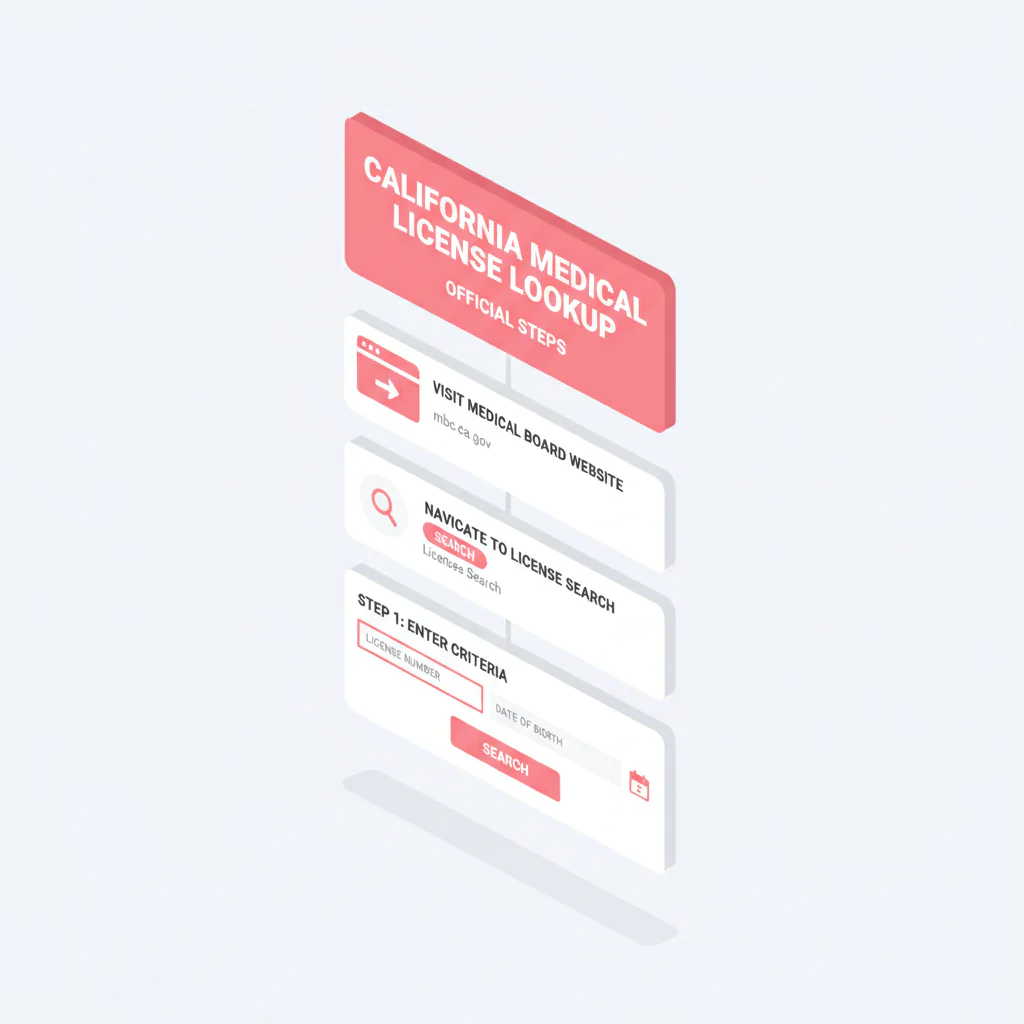
Start at the official source. Go to the Medical Board of California website and open the board’s license search tool (often labeled License Search).
-
Search with the strongest identifier you have. Best is the license number. If you only have a name, use additional identifiers (middle initial, city, or other details shown) to avoid false matches.
-
Open the individual physician profile page (not just the results list). Your “source of truth” is the profile page you can link back to and re-open later.
-
Confirm identity before copying fields. Validate you’re on the right person (name as displayed, location, and any other identifiers shown). If you have an NPI, use it as a cross-check in your internal record, but don’t assume it guarantees you’re on the correct board profile.
-
Fields to capture (copy/paste):
- License number
- Status (copy/paste the label verbatim)
- Issue date
- Expiration date (or renewal date, if that’s what the board shows)
- Disciplinary links/documents if shown (copy links only; do not interpret)
- Board profile URL (the page you’re viewing)
- Checked-on timestamp (date/time you performed the check)
-
Use a consistent internal definition for “license status.”
- License status definition: the exact standing label displayed on the Medical Board of California record at the time you checked it (copied verbatim), documented for downstream credentialing review.
If you can’t find the physician (fast troubleshooting)
- Multiple similar results: open each profile and match using the license number and “name as displayed” (don’t decide from the results list alone).
- Name variation: try middle initial, alternate last name, or a different first-name spelling if you have it from the CV.
- Still ambiguous: ask the candidate for their CA license number and expiration date, then re-run the search by license number.
- No record found: confirm you’re searching the correct license category on the board site and that you’re not mixing states.
California-specific workflow notes (Medical Board of California)
These CA-specific habits prevent most recruiter rework:
- Save the physician’s profile URL from the Medical Board of California site in your ATS. If a client or credentialing team asks “where did this come from?”, you can send the exact link instead of re-running the search.
- Copy the status label exactly as shown (don’t translate it into your own words). Different teams interpret eligibility differently; your job is to preserve the board’s wording and the checked-on timestamp.
- Document links live on the profile page. If the profile lists documents/links (including disciplinary-related items), capture the link text/title and URL only. Do not summarize the content.
- Name formatting can differ between resumes, NPI records, and the board profile. Capture “Name as displayed on board profile” as its own field to reduce wrong-person matches.
If you’re building a multi-state process, use the hub: state license lookups by state. If you’re cleaning provider records across systems, see NPI-to-license matching for cleaner provider records.
Diagnostic Table:
| Scenario | What to do on the Medical Board of California site | What to capture (copy/paste) | Fast fix if it’s messy |
|---|---|---|---|
| You have a CA license number | Search by license number and open the physician profile page | License number, status label, issue/expiration dates, board profile URL, checked-on timestamp | Ask candidate to confirm the license number digits and expiration date |
| You only have a name | Search by name, then confirm identity on the profile page | Name as displayed on profile, license number, status label, board profile URL | Use middle initial/city; if still ambiguous, request license number from candidate |
| You have an NPI but no license number | Use NPI to cross-check your internal record, then locate the correct CA board profile | NPI (internal), CA license number (board), board profile URL, checked-on timestamp | Don’t force-match; confirm identity on the board profile before copying fields |
| Profile shows documents/links | Stay on the profile page; capture link text and URL only | Document link titles/text and URLs as displayed on the profile | Route links to credentialing/compliance; keep recruiting notes factual |
Weighted Checklist:
Uniqueness hook (CA): “Fields-to-capture” worksheet that mirrors the board profile. Use this to standardize what your team copies from the Medical Board of California profile page, then map it into ATS fields so it’s reusable.
- (5) Official source confirmed: Record came from the Medical Board of California site.
- (5) Board profile URL saved: Stored in ATS field: Board Profile URL.
- (5) Checked-on timestamp saved: Stored in ATS field: License Checked On.
- (5) Name as displayed captured: Stored in ATS field: Board Profile Name (CA).
- (5) License number captured: Stored in ATS field: License Number (CA).
- (4) Status label captured verbatim: Stored in ATS field: License Status Label (CA).
- (4) Issue date captured: Stored in ATS field: License Issue Date (CA).
- (4) Expiration/renewal date captured: Stored in ATS field: License Expiration Date (CA).
- (3) Documents/links present? Stored as Board Documents Present (Y/N).
- (3) If present, links captured: Stored as Board Documents (URLs + titles) with no interpretation.
Scoring guidance: If you’re missing the board profile URL, checked-on timestamp, or license number, treat the record as incomplete and re-check before submittal.
Outreach Templates:
Use these when you need the candidate to confirm identifiers so you can match the correct Medical Board of California profile quickly. Include the phrase ca medical license lookup in your internal task name so your team can find the process later.
Template 1: Quick confirmation (text/email)
Subject: Quick CA license detail check
Hi [First Name] — I’m updating our CA credentialing fields for a submission. Can you confirm your CA license number and the expiration date you have on file? I’m matching it to the Medical Board of California profile.
Thanks,
[Your Name]
Template 2: Wrong-person prevention (email)
Subject: CA board profile match (confirm identifier)
Hi [First Name] — I’m seeing more than one similar name on the CA board search. What’s the best identifier to match you correctly: your CA license number, or the exact name format used on your board profile?
Appreciate it,
[Your Name]
Template 3: Document link transparency (email)
Subject: Saving official CA board profile link in your file
Hi [First Name] — for transparency, I’m saving the official CA board profile link we use for license record checks in your file. If your expiration date has updated recently, send it over and I’ll refresh the record.
Thanks,
[Your Name]
Common pitfalls
- Using non-official mirrors. Third-party pages can be outdated or incomplete. Anchor to the Medical Board of California profile URL.
- Paraphrasing the status label. Copy/paste the board’s wording and add a checked-on timestamp. The trade-off is… credentialing may still need to interpret eligibility for a specific facility, but your recruiting notes stay factual and auditable.
- Common-name collision (CA mini-case). Two “J. Smith” results look identical in the search list. The fix is to open each profile, capture Board Profile Name (CA), the license number, and save the board profile URL. That prevents wrong-person outreach and stops the team from re-running the search later.
- Interpreting disciplinary information. If links exist, store links. Do not interpret or make recommendations based on your reading.
- Skipping the profile URL. If nobody can click back to the exact record, you’ll redo the work under deadline.
How to improve results
1) Standardize ATS fields so you stop re-checking
- Board Profile URL
- License Checked On (timestamp)
- Board Profile Name (CA)
- License Number (CA)
- License Status Label (CA)
- License Issue Date (CA)
- License Expiration Date (CA)
- Board Documents Present (Y/N)
- Board Documents (URLs + titles)
2) Refresh cadence tied to funnel stage
- At first screen: capture license number, status label, board profile URL, and checked-on timestamp.
- Before client submittal: refresh status label and expiration/renewal date; update checked-on timestamp.
- Before start date: refresh again if your client requires it.
3) Measurement instructions (required)
Measure this by… tracking license-check rework rate: number of profiles that require a second board lookup due to missing fields or wrong-person matches divided by total lookups (e.g., per 100 lookups).
Also track time-to-record: time from “license check requested” to “fields saved + board profile URL + checked-on timestamp.” You can do this with a required ATS task and two timestamps.
4) Align sourcing vs credentialing handoffs
If your team splits responsibilities, agree on what recruiting captures vs what credentialing interprets. Use credentialing vs sourcing: what’s different to set the handoff cleanly.
Legal and ethical use
- This page is operational guidance for recruiters. It is not legal advice.
- Use license lookup data only for legitimate recruiting and credentialing workflows.
- Respect opt-outs and privacy requests. Don’t store unnecessary personal data.
- Do not interpret disciplinary information. If documents are linked, store the links and route to your compliance/credentialing process.
Evidence and trust notes
We prioritize official sources and transparent methodology. For how Heartbeat evaluates sources and handles data quality, see Heartbeat trust methodology.
FAQs
What fields should I capture from a California medical license lookup?
Capture license number, status label (copied verbatim), issue date, expiration/renewal date, the Medical Board of California profile URL, a checked-on timestamp, and any document links shown (links only, no interpretation).
What does “status” mean on a physician license record?
For recruiting ops, treat status as the exact standing label displayed on the Medical Board of California record at the time you checked it. Copy/paste it and record the checked-on timestamp.
Should I store disciplinary information in my ATS?
Store links/titles if the board provides them, and route to your credentialing/compliance process. Do not summarize or interpret the content in recruiting notes.
How often should I re-check a CA license record during a search?
Refresh at least before client submittal and again before start date if required. Always update the checked-on timestamp so the team knows how current the record is.
Can I match a physician’s NPI to their CA license?
Yes, as a workflow step, but confirm identity on the board profile before copying fields. For a structured approach, see NPI-to-license matching.
Next steps
- Standardize your ATS fields using the Weighted Checklist so every CA record has a profile URL and checked-on timestamp.
- Use the hub for other states: state license lookups by state.
- If you need faster outreach workflows after you’ve confirmed the record, start free search & preview data.
Note: If you’re building a phone-first recruiting motion, Heartbeat supports workflows like ranked mobile numbers by answer probability so your team spends more time in conversations and less time in voicemail loops.
About the Author
Ben Argeband is the Founder and CEO of Swordfish.ai and Heartbeat.ai. With deep expertise in data and SaaS, he has built two successful platforms trusted by over 50,000 sales and recruitment professionals. Ben’s mission is to help teams find direct contact information for hard-to-reach professionals and decision-makers, providing the shortest route to their next win. Connect with Ben on LinkedIn.