State medical license lookup: official board directory + recruiter workflow
Ben Argeband, Founder & CEO of Heartbeat.ai — Make it a directory + playbook; reduce recruiter confusion and wasted time.
What’s on this page:
Who this is for
This hub is for recruiters and ops teams verifying physicians by state before outreach or downstream credentialing steps. If you recruit across multiple states, you need a repeatable way to verify license and document license status so your team doesn’t re-check the same profile later.
- Recruiters who need fast eligibility checks before outreach.
- Recruiting ops teams standardizing verification notes and handoffs.
- Teams reducing wrong-person errors by pairing NPI with a state license number.
Recruiters use license status for eligibility, not diagnosis. This page is operational by design.
Quick Answer
- Core Answer
- Use NPI to confirm identity, then complete a state medical license lookup on the official state medical board portal to confirm license status before outreach.
- Key Insight
- Licensing data is public but fragmented; the fastest teams standardize NPI → state board verification → a reusable verification note.
- Best For
- Recruiters and ops teams verifying physicians by state before outreach/credentialing steps.
Compliance & Safety
This method is for legitimate recruiting outreach only. Always respect candidate privacy, opt-out requests, and local data laws. Heartbeat does not provide medical advice or legal counsel.
Record these fields every time (copy/paste standard):
- State + board portal URL
- Physician name + NPI
- License number
- License status (exact label) + effective date (if shown)
- Verification timestamp (date/time you checked)
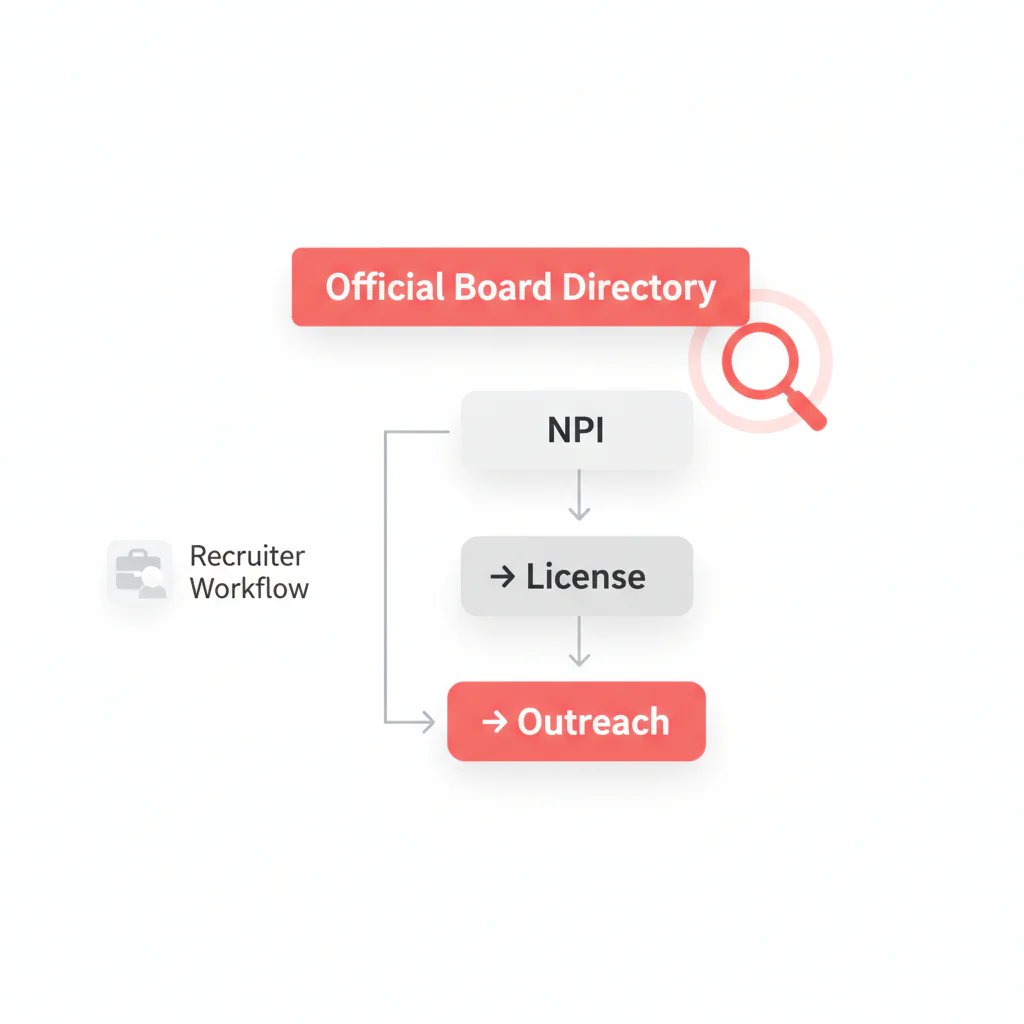
Framework: The “Identity First” Workflow: NPI → State License → Outreach
Most verification mistakes happen because teams check the wrong person, not because they skip the check. The “Identity First” workflow prevents that:
- NPI first (identity anchor): confirm you’re looking at the right clinician even when names are common or formatted differently.
- State license second (eligibility):license status and capture the license number from the official portal.
- Outreach third (execution):
The trade-off is… you spend an extra minute up front to avoid hours of rework (wrong outreach, wrong credentialing packet, or a submittal that dies on a basic eligibility check).
Step-by-step method
Step 0: Choose your path (use this hub fast)
- I need the official portal right now: go to the State directory table below and click the board site.
- I need a repeatable verification workflow: follow Steps 1–5 and standardize the verification note.
- I need to reduce wrong-person errors: start with NPI, then match the board profile to the same identity signals.
Step 1: Anchor identity with NPI
Start with the clinician’s NPI. Names change, initials vary, and some state portals return multiple matches. NPI is a stable identifier used across healthcare systems, which makes it a practical anchor for identity resolution.
- Capture: full name, NPI, specialty, and at least one location signal (city/state or practice address).
- Note name variants (middle initial present/absent, hyphenation, suffixes).
Step 2: Use the official state medical board portal for the license check
Go to the relevant state medical board portal and run the license search using the best available inputs (varies by state). Your goal is to record:
- License number
- License status (copy the exact label shown)
- Effective dates or last updated date (if displayed)
- Source URL and verification timestamp
Step 3: If the portal doesn’t support your preferred search input, use this fallback order
- Try fewer fields: last name only, then add city if the portal supports it.
- Try name variants:
- Use NPI to disambiguate:
Step 4: Cross-check with FSMB DocInfo when you need corroboration
When a state portal is slow, unclear, or you’re reconciling multi-state information, a corroboration step can reduce uncertainty. The Federation of State Medical Boards (FSMB) provides physician profile services (including DocInfo; see FSMB physician profile services).
- Use it to corroborate identity and multi-jurisdiction signals.
- For the authoritative license status in a specific state, rely on that state’s board portal and document what you saw.
Step 5: Write a verification note that prevents re-checking
Don’t just “check the box.” Store a verification note in your ATS/CRM so the next person doesn’t repeat the work:
- State, license number, license status (exact label), effective date (if shown)
- NPI
- Verified date/time and source URL
- Any discrepancy notes (e.g., address mismatch vs NPI)
Step 6: Re-verify triggers (when to check again)
- Before outreach if the profile was verified a while ago or the portal shows recent changes.
- Before submittal if your client requires current status confirmation.
- Before credentialing packet kickoff to avoid downstream rework.
Step 7: Move to outreach only after identity + eligibility are clean
Once verification is complete, proceed to outreach. If you’re using Heartbeat.ai, this is where verification connects to contact workflows so you don’t lose time switching between portals and your ATS.
Related ops read: Credentialing vs. sourcing: what’s different (and why it matters for speed).
Diagnostic Table:
Use this to decide what to do next when a license check is taking too long or producing ambiguous results.
| What you see | Likely cause | Fastest fix | What to record |
|---|---|---|---|
| Multiple matches for the same name | Common surname; name variants | Confirm identity with NPI, then match the correct board profile and capture the license number | NPI, matched city/address signal, license number, source URL |
| No results on the state portal | Input mismatch; different name format; wrong license type | Try last name only; remove punctuation; confirm you’re on the correct state medical board portal; corroborate with FSMB services if needed | Search terms tried + timestamp |
| License status label is unclear | State-specific terminology | Open the detailed profile; record the exact label and any effective dates | Exact status label + effective date + verification timestamp |
| State portal is down/slow | Maintenance or load | Use FSMB corroboration as a temporary step; set a reminder to re-check the state portal | Secondary source used + re-check date |
| NPI record and board profile don’t match on address | Data lag; clinician moved; multiple practice sites | Prioritize the state board for license status; use NPI for identity; document the discrepancy | Both sources + what differs |
State directory (official portals + Heartbeat guides)
Uniqueness hook (DIRECTORY_TABLE): state → official board portal → typical search inputs → Heartbeat guide. This is the shortcut that prevents portal hunting and inconsistent documentation.
| State | Board site (official) | Typical search inputs | Heartbeat guide |
|---|---|---|---|
| California | Medical Board of California | License number and/or name (use the state guide to confirm the exact fields and filters shown today) | CA medical license lookup |
| Texas | Texas Medical Board | License number and/or name (use the state guide to confirm the exact fields and filters shown today) | TX medical license lookup |
| Florida | Florida Board of Medicine | License number and/or name (use the state guide to confirm the exact fields and filters shown today) | FL medical license lookup |
| New York | NYSED Office of the Professions (Medicine) | Name and/or license number (use the state guide to confirm the exact fields and filters shown today) | NY medical license lookup |
| Pennsylvania | PA State Board of Medicine | Name and/or license number (use the state guide to confirm the exact fields and filters shown today) | PA medical license lookup |
| Illinois | Illinois Department of Financial and Professional Regulation (IDFPR) | Name and/or license number (use the state guide to confirm the exact fields and filters shown today) | IL medical license lookup |
| Ohio | State Medical Board of Ohio | Name and/or license number (use the state guide to confirm the exact fields and filters shown today) | OH medical license lookup |
| New Jersey | New Jersey Board of Medical Examiners | Name and/or license number (use the state guide to confirm the exact fields and filters shown today) | NJ medical license lookup |
| Georgia | Georgia Composite Medical Board | Name and/or license number (use the state guide to confirm the exact fields and filters shown today) | GA medical license lookup |
| North Carolina | North Carolina Medical Board | Name and/or license number (use the state guide to confirm the exact fields and filters shown today) | NC medical license lookup |
Coverage note: this hub starts with high-volume states. If your target state isn’t listed yet, use the FSMB Physician Data Center as a starting point to find the right board, then follow the same NPI → state board → verification note workflow.
Weighted Checklist:
Goal: standardize what “verified” means so recruiters, coordinators, and ops don’t re-check the same physician three times.
| Check | Weight | Pass criteria | Owner |
|---|---|---|---|
| NPI captured and matches intended physician | 30% | NPI aligns with name + at least one location/specialty signal | Recruiter / Sourcing |
| State license number captured | 25% | License number present and tied to the same identity | Recruiter / Ops |
| License status recorded with effective date (if shown) | 25% | Status label copied exactly as shown + verification timestamp | Ops |
| Source link stored (board profile or search result) | 10% | URL saved in ATS/CRM note | Ops |
| Corroboration used when ambiguous (FSMB services) | 10% | Used only when the state portal is unclear/down or identity is uncertain | Recruiter Lead |
Scoring rule: treat 80%+ as “ready for outreach,” 60–79% as “needs clarification,” and <60% as “do not outreach yet.”
Outreach Templates:
These templates assume you already verified identity and license status. Keep them short and operational.
Template 1: Initial outreach (verified, low-friction)
Subject: Quick question re: [State] coverage
Body:
Hi Dr. [Last Name] — I’m reaching out because we’re staffing [role] in [State]. I confirmed your [State] license status on the state medical board portal and wanted to ask: are you open to a quick call this week?
If yes, what’s the best number and two times that work?
— [Your Name], [Team]
Template 2: Ops-to-recruiter handoff note (prevents re-checking)
ATS/CRM Note:
Verified [State] license for [Full Name]. NPI: [NPI]. License number: [#]. License status: [exact label]. Effective date (if shown): [date]. Verified on: [timestamp]. Source: [URL]. Discrepancies vs NPI: [none / details].
Template 3: Clarification request when identity is ambiguous
Subject: Confirming details before we connect
Body:
Hi Dr. [Last Name] — before I schedule time, I want to make sure I have the right profile. Can you confirm your current practice city and whether you hold an active license in [State]?
Thanks — [Your Name]
Common pitfalls
Pitfall 1: Treating “license verified” as a binary
Different boards expose different fields. “Verified” should mean you captured the license number, the exact license status label, the verification timestamp, and the source URL.
Pitfall 2: Mixing up licensure with board certification
Board certification vs licensure definition: licensure is the state-granted legal authorization to practice medicine in that state. Board certification is a separate professional credential and is not the same as holding an active state license.
Pitfall 3: Searching by name only and accepting the first match
Common names create false positives. Use NPI to anchor identity, then match the state license record to that identity before you proceed.
Pitfall 4: Not standardizing what “license status” means in your pipeline
License status definition: the status label shown by the state medical board for a physician’s license (for example, active, inactive, expired, suspended). Always record the exact label and effective date shown by the board.
Pitfall 5: Losing time to context switching
If your team bounces between NPI pages, state portals, spreadsheets, and the ATS, you’ll re-check the same physician repeatedly. Consolidate the verification note format and make it mandatory before outreach.
How to improve results
1) Make the verification note a required field
Operationally, this is the fastest win. If a profile can’t move to “Outreach Ready” without a verification note, you stop duplicate work immediately.
2) Use identity resolution as a first-class step
Combine NPI + state license number in your record. If you only store a name and a state, you’ll eventually outreach the wrong person.
3) Measurement instructions (required)
Measure this by… tracking a weekly sample of verified profiles and calculating:
- Re-check rate = profiles that required a second license verification / total profiles verified (per 100 profiles).
- Wrong-person prevention rate = profiles where NPI prevented a false match / total profiles verified (per 100 profiles).
- Time-to-outreach readiness = median time from “new lead” to “verification note completed.”
Use these metrics to decide whether your bottleneck is (a) finding the right portal, (b) disambiguating identity, or (c) documenting consistently.
4) Connect verification to outreach execution (Heartbeat.ai)
Once verification is done, your next bottleneck is connectability. Heartbeat.ai is built to keep identity, verification, and outreach execution in one workflow. For P1 workflows, Heartbeat includes ranked mobile numbers by answer probability to help prioritize outreach attempts.
If you want to see how it fits your process, start free search & preview data.
Legal and ethical use
Licensing data is generally public, but your use still needs to be compliant and respectful:
- Use license verification for legitimate recruiting operations (eligibility checks, identity confirmation), not for clinical interpretation.
- Respect opt-out requests and suppression lists in your outreach systems.
- Follow applicable privacy and data laws based on where you operate and where the physician resides.
Heartbeat.ai does not provide legal advice or medical advice. If you need a formal compliance position, involve your counsel.
Evidence and trust notes
We prioritize primary sources and transparent methodology. For how we evaluate data quality and sourcing practices, see our Trust Methodology.
- FSMB overview (physician profile services)
- FSMB Physician Data Center
- CMS: National Provider Identifier (NPI) overview
Note: the authoritative source for a state’s license status is that state’s medical board portal; fields and terminology vary by state.
FAQs
What should I capture for auditability after I verify license information?
Capture state, license number, license status (exact label), effective date (if shown), verification timestamp, and the source URL. Also store NPI to prevent identity mix-ups.
What is a state medical license lookup used for in recruiting?
It’s used to confirm eligibility signals (like license status and license number) before you invest outreach and before you trigger downstream credentialing steps.
Should I use FSMB DocInfo or the state medical board portal?
Use the state medical board portal as the authoritative source for that state’s license status. Use FSMB physician profile services as corroboration when the state portal is unclear, slow, or you’re reconciling multi-state information.
Is board certification the same as having an active license?
No. Licensure is state authorization to practice in that state. Board certification is a separate credential and doesn’t replace a state license check.
How does NPI help with license verification?
NPI is a stable identifier that helps you confirm you’re looking at the right clinician when names are common or formatted differently across systems. Pair NPI with the state license number for cleaner identity resolution.
Next steps
- Use the State directory table to jump to the official portal for your target state, then open the matching Heartbeat guide for portal quirks.
- Standardize your verification note format and make it required before outreach.
- If you need identity + verification + outreach in one workflow, start free search & preview data in Heartbeat.ai.
- For related workflow design, read: NPI + license matching for cleaner provider identity and how to structure physician sourcing by specialty and state.
About the Author
Ben Argeband is the Founder and CEO of Swordfish.ai and Heartbeat.ai. With deep expertise in data and SaaS, he has built two successful platforms trusted by over 50,000 sales and recruitment professionals. Ben’s mission is to help teams find direct contact information for hard-to-reach professionals and decision-makers, providing the shortest route to their next win. Connect with Ben on LinkedIn.